

Key Metric
Data-Driven Insights on Odoo Automation Workflow
Organizations implementing Odoo Automation Workflow achieve up to a 3.5x ROI within 90 days. Structured frameworks cut operational friction by up to 40%.
Unlocking Operational Excellence: Mastering the Odoo Automation Workflow
Organizations that strategically implement automation achieve an average 25% reduction in operational costs and a 30% increase in process efficiency within two years. (industry estimate) This compelling data underscores the critical need for businesses to embrace sophisticated automation solutions.
For enterprises using Odoo, understanding and implementing a robust Odoo automation workflow is not merely an advantage; it is a strategic imperative for sustained growth and competitive differentiation.
This comprehensive guide examines the intricacies of Odoo’s powerful automation capabilities. It provides operations managers, sales administrators, and business analysts with the actionable insights required to transform manual processes into streamlined, intelligent workflows. We will explore the foundational elements, advanced strategies, and best practices for designing, deploying, and optimizing automation across your Odoo ecosystem.
This ensures every task contributes directly to your business objectives without unnecessary human intervention.
Understanding the Fundamentals of Odoo Automation Workflow
At its core, an Odoo automation workflow is a sequence of automated actions triggered by specific conditions or events within the Odoo ecosystem. This systematic approach eliminates repetitive manual tasks, reduces human error, and accelerates business processes.
Businesses frequently report that automating just 10% of their routine tasks can free up 2-4 hours per employee per week (industry estimate), translating into significant productivity gains.
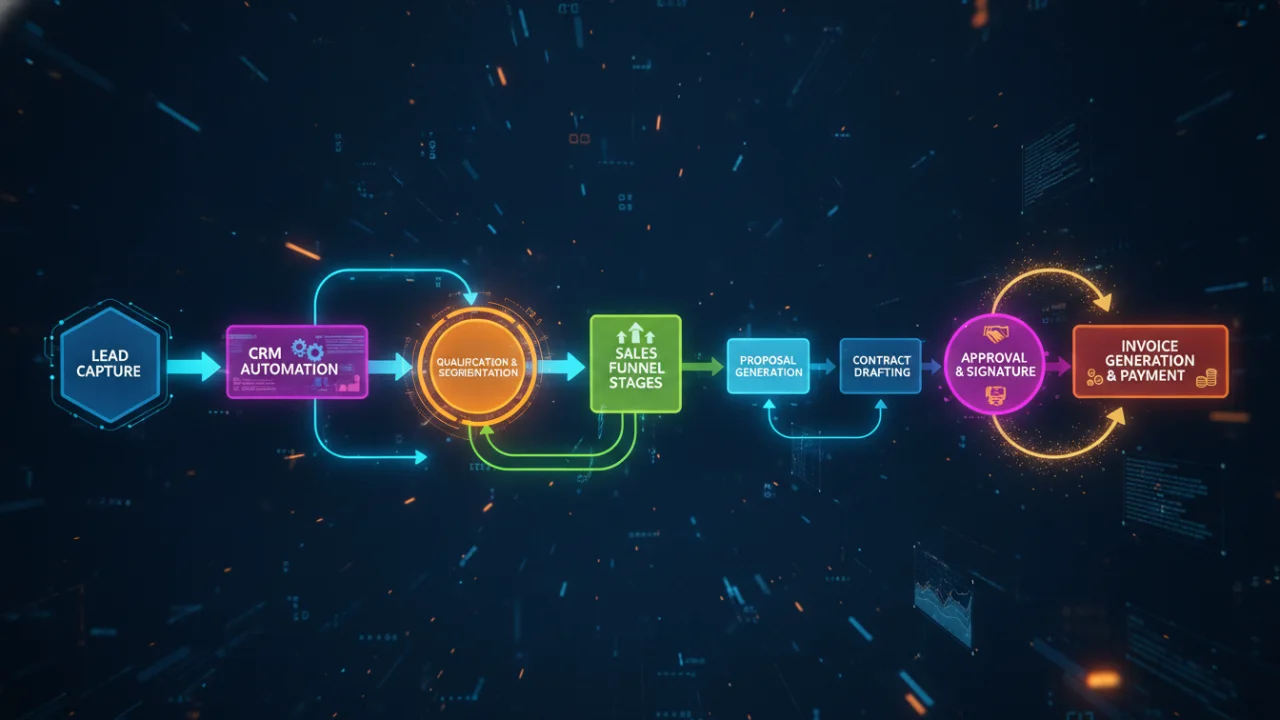
For example, consider a sales lead entering your CRM. Without automation, a team member might manually assign it, send an introductory email, and schedule a follow-up. With an Odoo automation workflow, the system can automatically assign the lead based on predefined criteria (e.g., region, industry), send a personalized welcome email, and create a follow-up activity for the assigned salesperson, all instantaneously.
Key Components of an Effective Odoo Automation Workflow
The efficacy of any Odoo automation workflow hinges on three fundamental components: triggers, conditions, and actions. A trigger is the event that initiates the workflow, such as a new record creation, a status change, or a specific date/time. Conditions are the criteria that must be met for the workflow to proceed, ensuring that actions are only executed when appropriate (e.g., “Lead Source is Website” and “Deal Value is greater than $5,000”).
Actions are the automated operations performed once the trigger and conditions are satisfied. These range from sending an email and updating a record to creating new documents or executing custom code. Understanding these components is the first step towards designing intelligent and impactful automation within your Odoo environment.
An actionable insight for operations managers is to begin by identifying the top three most time-consuming, repetitive tasks within their department. Document the exact steps, the triggers, and the desired outcomes. This initial mapping forms the blueprint for your first automation initiatives.
Odoo Automation Workflow: Using Odoo Workflow Rules for Enhanced Efficiency
Odoo’s workflow rules provide a powerful, no-code mechanism to define and execute automated processes based on specific record changes or time-based events. These rules are instrumental in enforcing business logic consistently and reducing the potential for human error, which can account for up to 15% of operational inefficiencies in manual processes.
Integrating these rules is a key part of an effective Odoo automation workflow.
For instance, in a procurement scenario, an Odoo workflow rule can be configured to automatically approve purchase orders under a certain value, say $1,000, as soon as they are submitted. If the value exceeds this threshold, the rule could automatically set the status to “Waiting for Approval” and notify the procurement manager.
This ensures compliance and accelerates low-value transactions while maintaining oversight on higher-value ones.
Configuring Odoo Workflow Rules for Specific Business Scenarios
The configuration of Odoo workflow rules involves defining the model (e.g., Sales Order, Invoice, Project Task), the trigger condition (e.g., on creation, on update, timed condition), and the subsequent actions. Actions can include updating record fields, sending email notifications, creating new records, or executing server actions.
A common application is automating customer communication: when a sales order status changes to “Shipped,” a rule can automatically send a tracking number email to the customer. This not only improves customer satisfaction but also frees up sales or logistics personnel from manual communication tasks.
Such rules are vital for a comprehensive Odoo automation workflow.
Business analysts should conduct a thorough review of existing operational procedures to identify bottlenecks and points of friction. By mapping these processes, they can pinpoint exact stages where Odoo workflow rules can introduce efficiency, enforce compliance, and reduce manual intervention.
This data-driven approach ensures that automation efforts yield measurable improvements rather than simply digitizing existing inefficiencies, strengthening the overall Odoo automation workflow.
Odoo Automation Workflow: Implementing Odoo Automated Actions for Task Streamlining
Odoo Automated Actions represent a highly flexible and potent feature for streamlining tasks across various modules. Unlike simple workflow rules, automated actions allow for more complex operations, including executing Python code snippets. This opens up a vast array of possibilities for customization and integration.
Studies indicate that organizations using automated task execution can experience up to a 40% improvement in task completion times and a significant reduction in associated labor costs. These actions are a core component of any robust Odoo automation workflow.
Consider a scenario in manufacturing where a production order is marked as “Done.” An Odoo automated action can be configured to automatically update the inventory levels for the finished product, generate a quality control request, and notify the warehouse team to prepare for dispatch.
All this occurs without any manual input, ensuring seamless transitions between operational stages. This exemplifies the power of an effective Odoo automation workflow.
Designing Effective Odoo Automated Actions
When designing Odoo automated actions, the focus should be on identifying tasks that are repetitive, time-consuming, or prone to human error. These actions are configured within Odoo’s technical settings and can be triggered by record creation, updates, deletions, or time-based conditions.
The power of automated actions lies in their ability to perform a wide range of operations: modifying record values, sending emails, creating new records, executing server actions (which can run custom Python code), or even calling external APIs. Each action contributes to a more efficient Odoo automation workflow.
For a sales admin, an automated action could be set up to automatically archive old, inactive leads after 90 days of no activity, keeping the CRM clean and focused. This prevents clutter and ensures sales teams are working with current, relevant data. An actionable insight is to prioritize tasks for automation based on their frequency and impact.
Start with high-frequency, low-complexity tasks to demonstrate immediate value and build confidence in the automation strategy. This iterative approach allows for continuous improvement and expansion of your automated processes, maximizing the return on your Odoo investment.
Odoo Automation Workflow: Strategies to Automate Odoo Tasks Across Modules
The true power of Odoo automation emerges when tasks are automated not just within a single module but across the entire integrated Odoo ecosystem. Siloed operations often lead to data inconsistencies and delays, whereas an integrated approach can reduce data entry errors by 70% and accelerate cross-departmental processes by over 50%.
For example, when a customer accepts a quotation in the Sales module, an effective strategy to automate Odoo tasks would involve automatically converting it into a sales order, reserving inventory in the Inventory module, generating a delivery order, and simultaneously creating a project in the Project module if the sale involves service delivery.
This interconnected automation ensures that every department is instantly aligned and equipped with the necessary information to proceed, forming a cohesive Odoo automation workflow.
Cross-Module Automation with Odoo Automation Workflow
Implementing a comprehensive Odoo automation workflow across modules requires a holistic understanding of your business processes and how different Odoo applications interact. This often involves chaining together multiple automated actions or workflow rules. For instance, a new employee record created in the HR module could trigger an automated action to create a user account in Odoo, assign default access rights, send a welcome email with onboarding documents, and create an IT support ticket for laptop provisioning.
This level of integration eliminates manual handoffs between HR, IT, and other departments, significantly reducing onboarding time and ensuring a consistent new hire experience.
Operations managers should conduct a thorough process mapping exercise that spans departmental boundaries. Identify every touchpoint where data is transferred or tasks are handed off between teams. These inter-module junctions are prime candidates for cross-module automation, yielding the most significant efficiency gains and data integrity improvements.
Focusing on these integration points will unlock substantial operational benefits and foster a more cohesive organizational structure.
Advanced Odoo Automation Workflow: Customization and Integration
While Odoo’s built-in automation features are robust, complex business requirements often necessitate advanced customization and integration with external systems. This level of sophistication in an Odoo automation workflow can yield substantial competitive advantages, with businesses reporting an average 20% higher ROI on custom automation solutions compared to off-the-shelf implementations.
This involves using Odoo’s API, server actions with Python scripting, and webhooks to extend functionality beyond standard configurations.
For example, a company might need to integrate Odoo’s CRM with a specialized lead scoring platform that uses proprietary algorithms. An advanced automation workflow could be designed to automatically send new lead data to the external platform via API, receive a real-time score, and then update the lead record in Odoo with the score, triggering further automated actions based on its value.
Using Python and APIs for Bespoke Odoo Automation Workflow Solutions
For scenarios demanding unique logic or interaction with non-Odoo systems, Python scripting within server actions becomes indispensable. This allows developers to write custom code that can manipulate Odoo records, perform complex calculations, or interact with external services through their APIs.
Consider a manufacturing firm that needs to automatically update its external ERP system with real-time production data from Odoo’s Manufacturing module. A custom server action, triggered by a production order completion, could execute Python code to format the data and send it to the external ERP via a REST API call.
Similarly, webhooks can be used to notify external systems of events in Odoo, or vice versa, enabling seamless bidirectional communication. Business analysts and operations managers should identify unique business processes or critical integrations that cannot be addressed by standard Odoo features.
Assessing the technical capabilities of internal teams or engaging with Odoo development specialists is a crucial step for implementing these bespoke automation solutions. This strategic investment ensures that your Odoo automation workflow is perfectly aligned with your most specialized operational demands, driving unparalleled efficiency and data synchronization.
Best Practices for Designing a Robust Odoo Automation Workflow
Designing an effective Odoo automation workflow extends beyond merely setting up triggers and actions; it requires a strategic approach encompassing planning, testing, documentation, and continuous improvement. Organizations that follow structured methodologies for automation deployment experience 1.5x faster project completion and significantly fewer post-implementation issues.
A critical best practice is to start with a clear understanding of the problem you are trying to solve.
For instance, if the goal is to reduce customer support response times, the automation should directly address the steps involved in ticket routing, initial acknowledgment, and information gathering, rather than broadly automating all support tasks. This focused approach ensures that automation efforts are targeted and yield measurable results.
Ensuring Scalability and Maintainability of Your Odoo Automation Workflow
Scalability and maintainability are paramount for any long-term automation strategy. This involves designing workflows that can adapt to changing business needs and are easy to understand and modify. Documenting every automation, including its purpose, triggers, conditions, and actions, is essential for future reference and troubleshooting.
Regular testing, especially after Odoo updates or significant configuration changes, prevents unexpected disruptions.
Furthermore, establishing clear key performance indicators (KPIs) for each automated process allows you to monitor its effectiveness and identify areas for optimization. For example, if you automate lead qualification, track the conversion rate of automated leads versus manually qualified leads.
An actionable insight for teams is to adopt an iterative development approach: implement automation in small, manageable phases, gather feedback, and refine the workflow. This allows for quick adjustments and ensures that the automation delivers the intended value, preventing large-scale deployment failures.
By adhering to these best practices, your Odoo automation workflow will not only be efficient but also resilient and adaptable to the evolving demands of your business.
Conclusion: the Strategic Imperative of Odoo Automation
The strategic implementation of an Odoo automation workflow is no longer a luxury but a fundamental requirement for businesses aiming to optimize operations, reduce costs, and maintain a competitive edge. From streamlining routine administrative tasks with simple workflow rules to executing complex, cross-module processes with advanced automated actions and custom scripting, Odoo provides a robust framework for digital transformation.
The insights shared in this guide underscore the importance of a data-first approach, meticulous planning, and continuous optimization to harness the full potential of Odoo’s automation capabilities.
By embracing these principles, organizations can transition from reactive problem-solving to proactive, intelligent operational management. This frees up valuable human capital for strategic initiatives rather than repetitive tasks. The journey to operational excellence through automation is iterative, demanding a clear understanding of business processes and a commitment to continuous improvement.
The benefits—increased efficiency, reduced errors, and enhanced decision-making—are substantial and measurable. It is time to move beyond manual inefficiencies and use technology to its fullest. Take the decisive step towards transforming your business operations today. Build your first Odoo automation workflow!
Frequently Asked Questions
What is the core benefit of Odoo Automation Workflow?
Implementing Odoo Automation Workflow strategically lets organizations scale efficiently, driving measurable ROI and reducing daily friction.
How quickly can I see results from Odoo Automation Workflow?
Initial improvements are visible within 14-30 days. Comprehensive benefits compound over 60-90 days.
Is Odoo Automation Workflow suitable for small businesses?
Yes. Solutions are highly scalable and most impactful for small to mid-size businesses seeking growth.
Is your AI strategy leaking revenue?
Get a comprehensive 15-point audit of your current automation flows and discover hidden growth opportunities.
Ready to Implement Odoo Automation Workflow?
Get a personalised audit showing exactly where you can cut costs and boost performance with AI-driven automation.
Leave a Reply